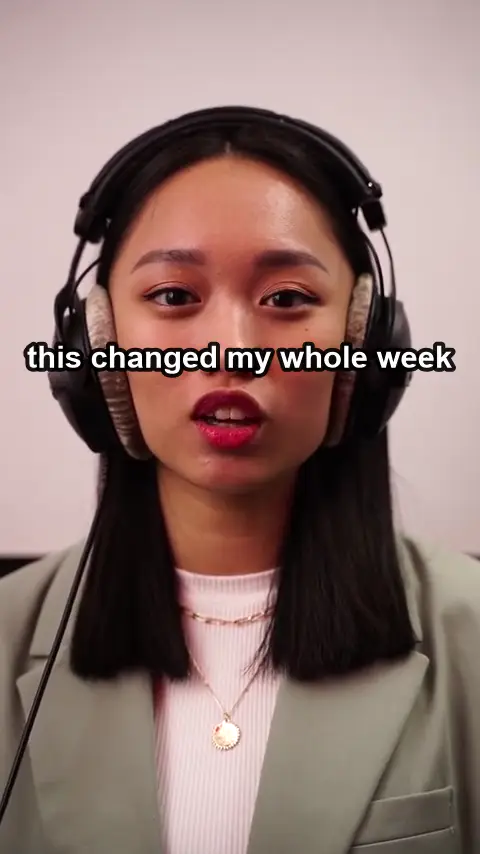
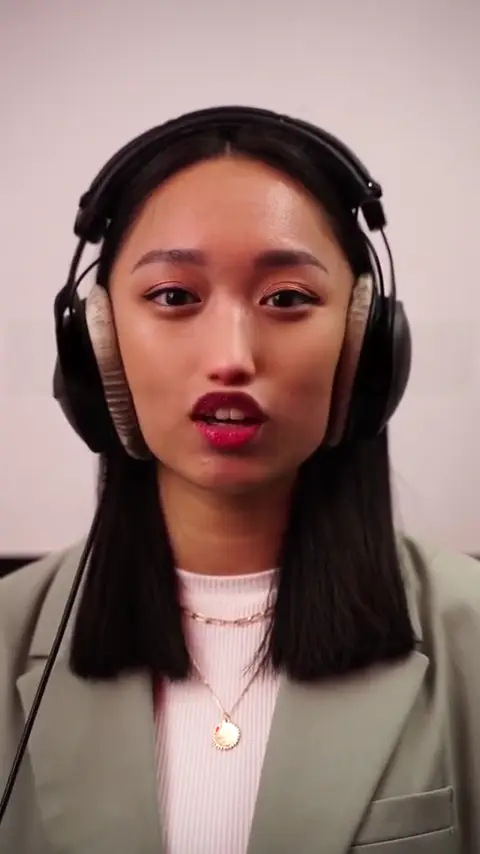
Text on a face
A caption across someone’s face
Hardest case: skin, lips and a talking jaw behind the letters.
● Subtitles · Captions · Burned-inFree preview — no sign-up
Even the burned-in kind.
Upload the clip, keep the subtitle lines the detector finds, and we rebuild the picture behind every letter. Your audio and resolution stay as they were.
Drop a video here
MP4 · MOV · WEBM — up to 10 min
Unretouched output from our pipeline — drag the pink playhead to compare. Footage: Tianwang Xiao / Pexels. Subtitles added by us, then removed by our pipeline.
Hardcoded subtitles are pixels, not a separate track, so there is nothing to switch off. When you upload, the detector proposes a box for each line of text it finds. Nothing is removed until you tick it. Subtitle boxes default to text mode, which rebuilds only the letters and their outline and leaves the rest of the box as it was.
Each line is rebuilt from the frames around it, so a wall, a sky or a street behind the words comes back with its own texture. Everything outside the mask is copied from your original: in our measurements the average change there is under 2/255. The output keeps your resolution and your audio track.
Standard rebuilds the masked area at 480p and pastes it back at full size, which suits most subtitles over plain or slow backgrounds. Choose HD (720p) when large captions sit over faces, hair or fine moving detail. Those areas can look soft in Standard. A tighter box around each line also helps, because less of the picture has to be rebuilt.
A typical job: a clip arrives with burned-in subtitles in one language and you need clean frames for new ones. Upload it and let the detector propose a box for each line. Keep the subtitle boxes, untick any text that belongs to the scene, and render. Then add the new subtitles in your editor as usual. Placing them where the old lines were is a good habit, because any soft patch ends up underneath them.
Some videos move subtitles to the top when something important sits at the bottom, or show speaker names in a different spot. You can use up to 24 boxes per video, and each box can have its own start and end time. Give each position its own box and set the times to when that caption is on screen. The area is then only rebuilt while text is actually there.
Karaoke captions that change colour word by word, or captions that pop in one word at a time, stay in the same band of the frame, so one box per line usually covers them. Size the box for the longest version of the line, including any highlight or outline. Captions that bounce, scale up or fly across the frame are harder: the box has to cover the whole path, and a bigger box means more picture is rebuilt.
Most subtitles sit on a dark band, a sky, a wall or a slow background, and Standard handles those well. It rebuilds at 480p, pastes back at full size and costs 1 credit per second. HD rebuilds at 720p for 3 credits per second. It is worth paying for when large captions cover faces, hair or detailed moving texture, which can look soft in Standard. The one-frame preview is free, so check before you choose.
Related tools: Remove emoji from video, Remove your logo from video, Video eraser for text and objects. Hands-on notes in our guides.
Three clips we ran through the same pipeline you will use. Run your cursor across any of them — or press and hold on a phone — to bring back what was there.
Text on a face
Hardest case: skin, lips and a talking jaw behind the letters.
Sticker + title
A solid badge and a title over a busy fruit stall, camera moving.
Object
Real footage, handheld push-in, a person moving in front.
MP4 or MOV, up to 10 minutes. Nothing to install, no sign-up for the preview.
We box every line of text for you — tick the ones to remove. Or draw a box over an object.
We rebuild the pixels behind it on every frame and hand back your video at its original resolution, with its audio.
We cut your clip into six-second segments and clean them all at once. Neighbouring segments overlap by eight frames and are crossfaded, so nothing flickers at the seams. Then only the masked pixels are pasted back onto your original.
One credit cleans one second of video. HD costs three. Failed renders refund themselves. Credits last a year. New accounts get 20 free.
150 credits · 3 min standard
600 credits · 10 min standard
2,000 credits · 33 min standard
600 credits every month · cancel any time
Upload an MP4, MOV or WebM clip up to 10 minutes. The tool boxes every line of text it detects. Keep the subtitle boxes, untick anything else, check the free preview, then render.
It is made for hardcoded ones, the subtitles burned into the picture. Soft subtitles (SRT or embedded tracks) can be turned off in your player or editor, so you do not need us for those.
No blur is applied. The background is rebuilt from nearby frames. Over plain backgrounds it is usually hard to spot. Over faces or fast detail it can look soft, so try HD or a tighter box there.
Standard is 1 credit per second, so 60 credits for a minute. HD is 3 credits per second, 180 for a minute. New accounts get 20 free credits, and failed renders are refunded.
Yes. Every detected line gets its own box, and nothing is removed unless you tick it. You can keep a speaker name or a title card, for example, and remove only the dialogue lines.
Not in one file. The limit is 10 minutes and 800 MB per upload. Split the longer video into parts in your editor, process each part, then join them again.
Make it never there.
Upload a videoMove your cursor over the wordDrag your finger across the word